

# Typing Speed Test Passage Difficulty: Build Scores You Can Trust
A typing speed test only gives a fair WPM score when the passage difficulty matches the skill you want to measure. Easy lowercase text measures rhythm. Mixed case, punctuation, numbers, and symbols measure transfer to real writing. The practical fix is to score passages before you compare results: rate character mix, word length, punctuation load, number load, and correction cost, then test within the same difficulty band.
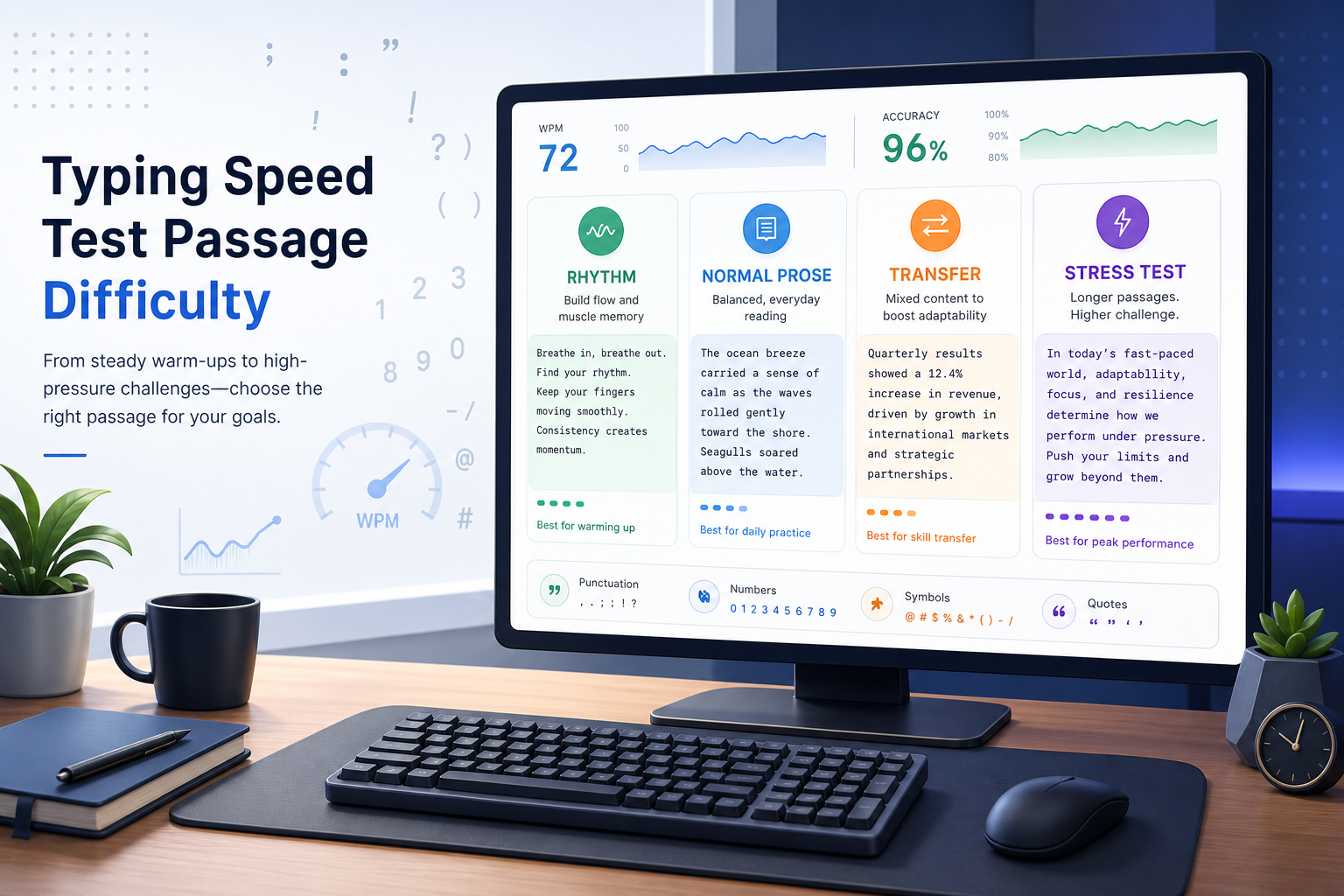
If your WPM jumps between tests, the problem may be the passage, not your fingers. This guide gives you a repeatable passage difficulty ladder, a scoring table, and a weekly plan for using TypeTest without comparing apples to a basket of typographical inconveniences.
# What passage difficulty changes in a typing speed test
Passage difficulty changes three parts of a typing speed test: how fast you can recognize the next chunk, how cleanly your hands can execute it, and how much time you lose after mistakes.
Lowercase common words are fast because they reduce decisions. You can read ahead, hold rhythm, and use familiar finger patterns. A passage with uppercase letters, commas, quotes, digits, hyphenated words, and unfamiliar terms adds switching cost. Your raw key speed may be the same, but the final WPM drops because each extra text feature adds friction.
That distinction matters when you use scores for training. A 78 WPM result on simple text and a 62 WPM result on technical text can both be accurate. They answer different questions.
Use this split:
- Capacity WPM: your speed on simple, familiar text.
- Production WPM: your speed on text that resembles school, work, coding notes, support replies, or documentation.
- Transfer gap: the difference between those two scores.
For a broader measurement baseline, pair this method with the existing TypeTest guide on building scores that match real writing output. If your scores also vary by run length, add the typing test WPM normalization method.
# The five factors that make a passage harder
A passage does not become harder in one way. It becomes harder through several small taxes that stack.
# 1. Character mix
Plain alphabetic text is easier than text with digits, symbols, accents, and mixed punctuation. Each category adds a different movement pattern. Digits often move your hands away from the home row. Symbols may require Shift, AltGr, or a layout layer. Accents and composed characters add another layer for multilingual typing.
If you recently tested dead keys or IME conversion, keep those passages separate. They measure input method behavior, not ordinary passage difficulty.
# 2. Capitalization and Shift use
Title case, acronyms, names, and sentence starts add Shift timing. A passage with many proper nouns can slow you down even if every word is familiar.
Log capitalization errors separately. A missed capital often creates a small correction chain: backspace, Shift, letter, continue. That chain costs more than the visible typo suggests.
# 3. Word length and familiarity
Short common words support chunking. Long uncommon words force more visual checking and increase the chance of transposition errors. Technical terms, names, and rare words create a reading load before they create a typing load.
This is why a typing speed test based on random simple words can feel clean while a paragraph from a policy document feels oddly sticky.
# 4. Punctuation density
Commas, periods, quotes, parentheses, colons, semicolons, and hyphenated terms add timing changes. Punctuation also changes your correction pattern. Many typists recover quickly from a wrong letter but lose rhythm after a missing quote or misplaced comma.
If punctuation is your main gap, use the earlier guide on type speed test punctuation calibration after you set passage bands.
# 5. Line structure and scanning load
Lists, short fragments, URLs, code-like snippets, and dense paragraphs create different visual demands. A paragraph supports read ahead. A list with numbers and labels creates stops. A URL or command-like string punishes one-character errors.
Accessibility guidance also treats text structure as part of readability. The W3C reading level guidance explains why unusually complex text can reduce comprehension for some readers, while PlainLanguage.gov recommends familiar words and clear structure for public content. CAST's accessible text guidance also emphasizes predictable structure and readable chunks. Those ideas apply neatly to typing passages: text that is harder to read is usually harder to type consistently.
# Passage difficulty scoring table
Use this table before you compare WPM scores. Score each factor from 0 to 3, then add the total.
| Factor | 0 points | 1 point | 2 points | 3 points |
|---|---|---|---|---|
| Character mix | Lowercase letters only | Basic punctuation | Digits or symbols | Accents, commands, URLs, or code-like text |
| Capitalization | None | Sentence starts only | Names or acronyms | Frequent mixed case |
| Word length | Mostly 3 to 6 letters | Some longer words | Many 8 plus letter words | Dense technical terms |
| Punctuation density | Almost none | Normal sentences | Frequent commas, quotes, or parentheses | Heavy punctuation or nested marks |
| Scanning load | Simple paragraph | Mixed sentence lengths | Lists or labels | URLs, tables, forms, or fragmented text |
Interpret the total like this:
| Total score | Difficulty band | What it measures | Best use |
|---|---|---|---|
| 0 to 3 | Band A, rhythm | Capacity WPM and confidence | Warmups and speed building |
| 4 to 7 | Band B, normal prose | Everyday writing speed | Main weekly benchmark |
| 8 to 11 | Band C, transfer | Work, study, and technical writing | Production WPM checks |
| 12 to 15 | Band D, stress test | Error recovery under heavy friction | Short diagnostic blocks |
Do not treat Band A and Band C scores as competing results. Treat them as different instruments. A stopwatch and a kitchen scale both measure things; swapping labels would make dinner unnecessarily scientific.
# How to run a fair typing speed test with passage bands
A fair typing speed test uses matched passages inside one difficulty band. Follow this protocol when you want a score you can compare week to week.
- Pick one target band for the session.
- Choose three passages with the same total difficulty score, plus or minus one point.
- Use the same duration for every run, ideally 60 seconds for your weekly benchmark.
- Keep correction behavior constant. Decide whether you correct every error or continue through mistakes.
- Record WPM, accuracy, uncorrected errors, corrected errors, and passage band.
- Use the median score, not the best score.
The median matters because one lucky passage can flatter you. One awkward sentence can punish you. Three runs give enough signal for a weekly check without turning practice into paperwork with a keyboard attached.
If you test on TypeTest, keep one session for Band B and one session for Band C. Band B tells you whether general typing is improving. Band C tells you whether that speed survives real text.
# A practical weekly passage plan
Use this 30 minute weekly plan when you want progress data without overcomplicating the habit.
# Monday: Band A rhythm block
Run four short rounds on simple text. Focus on relaxed rhythm, clean key travel, and low correction pressure. Stop chasing top speed once accuracy drops below your normal range.
Goal: build capacity without adding text friction.
# Tuesday: Band B benchmark
Run three 60 second rounds on normal prose. Use the median WPM and median accuracy as your weekly reference score.
Goal: track ordinary writing speed.
# Wednesday: focused weakness drill
Review Tuesday's errors. If the misses came from capitals, pick a passage with more proper nouns. If punctuation caused the misses, choose comma and quote heavy text. If long words caused stalls, choose technical prose.
Goal: train one friction source at a time.
# Thursday: Band C transfer block
Run three rounds with denser text. Include numbers, longer words, and normal punctuation. Keep the passage score between 8 and 11.
Goal: measure production WPM.
# Friday: conversion check
Compare Band B and Band C. If Band C is more than 20 percent lower, keep training passage difficulty before you chase a higher headline WPM. If the gap is under 10 percent, you can increase pace or move to harder text.
Goal: decide what to train next.
# Decision checklist: what your passage gap means
Use this checklist after you collect one week of scores.
- Band A is high, Band B is low: you have rhythm but lose speed in normal sentence mechanics. Train capitalization and punctuation.
- Band B is stable, Band C collapses: your score does not transfer to technical or work-like text yet. Add numbers, longer words, and denser passages.
- Accuracy drops before WPM drops: slow the first 15 seconds and reduce correction chains.
- WPM drops while accuracy stays high: reading load or unfamiliar words are probably the bottleneck. Practice read ahead with moderate pace.
- Errors cluster around symbols or digits: isolate those characters in short drills before returning to full passages.
- Scores vary wildly inside the same band: your passages are not matched closely enough, or your session setup changed.
This checklist is more useful than asking whether a score is good in the abstract. A good score is one that answers the right measurement question.
# How to build your own passage set
You do not need a large library. Start with twelve passages: three for each band.
For Band A, use short common words and simple sentences. For Band B, use normal paragraphs with sentence punctuation. For Band C, use work-like text with names, numbers, and longer terms. For Band D, use short diagnostic snippets that include URLs, quoted text, forms, or symbol-heavy content.
Keep each passage long enough for a 60 second run at your current speed. If you type 70 WPM, use at least 90 to 110 words so you do not run out of text. If you type 100 WPM, use more.
Store a small note next to each passage:
- Band score
- Word count
- Main friction source
- Date added
- Best median WPM
- Best median accuracy
Replace passages when you memorize them. Memorization turns a typing speed test into a recall test with moving fingers.
# Common mistakes when comparing passage difficulty
The first mistake is comparing a simple word list to dense prose and treating the result as personal decline. It is only a harder passage.
The second mistake is changing several variables at once. If you switch duration, passage band, keyboard, and correction rules, the score cannot tell you what changed.
The third mistake is using Band D too often. Stress text is useful for diagnosis, but it can train hesitation if every session feels hostile. Use it sparingly, then return to Band B or Band C.
The fourth mistake is ignoring accuracy. Passage difficulty often reveals itself through correction cost before it shows up in WPM. Track both.
# Sources worth using when you design passages
Use external guidance to keep passages readable and consistent:
- W3C WCAG guidance on reading level (opens new window) for plain-language considerations.
- PlainLanguage.gov guidelines (opens new window) for familiar words, direct structure, and reader-friendly text.
- CAST guidance on accessible text structure (opens new window) for chunking and predictable organization.
These sources will not calculate WPM for you. They help you avoid building passages that measure confusion instead of typing skill.
# Conclusion
A typing speed test becomes more useful when you label passage difficulty before you trust the score. Use the five-factor table, group passages into bands, and compare results only inside the same band. Then use the gap between Band B and Band C to decide whether to train speed, punctuation, numbers, symbols, or read ahead.
Run your next TypeTest session with one normal prose passage and one transfer passage. The difference between them will show you which part of your typing speed is ready for real work and which part still needs practice.