

# Average Typing Speed by Age: Read Your WPM Fairly
Average typing speed by age is useful only when you treat it as context. A 12-year-old, a college student, a programmer, and a retired office worker can all type at different speeds for reasons that have little to do with effort. Device, passage difficulty, keyboard familiarity, and correction habits can move a score as much as age. Use age bands to set a fair starting point, then judge your progress by repeatable WPM, accuracy, and comfort.
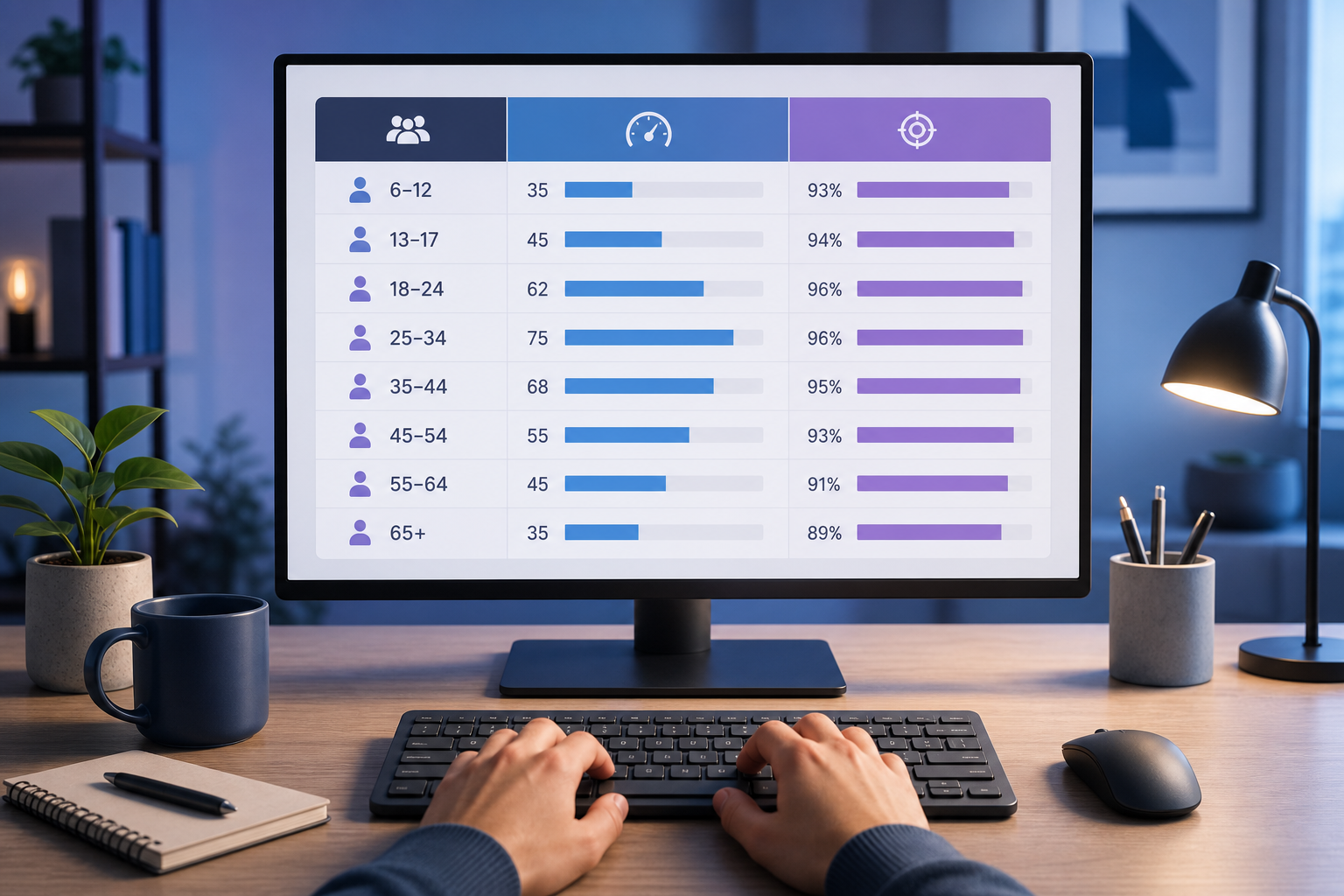
# What average typing speed by age actually means
Average typing speed by age describes the typical words per minute someone reaches within an age group under a specific test setup. It does not describe potential. It also does not explain whether the test used simple words, punctuation, numbers, a phone keyboard, a laptop keyboard, autocorrect, or a strict correction rule.
That matters because typing is a learned motor and language task. The large Aalto University typing study (opens new window) measured thousands of people and found wide variation in typing behavior across devices and users. The practical lesson is simple: age can shape exposure and habits, but the test environment shapes the score you see today.
For a clean baseline, run the same test length twice on the same keyboard. Use the main TypeTest typing test (opens new window) for a standard desktop result. Record WPM and accuracy together. A 52 WPM score at 99 percent accuracy often transfers better to schoolwork or email than 62 WPM at 90 percent accuracy with heavy backspacing.
# Use age bands as a reference, not a verdict
The table below gives a practical comparison frame. Treat the ranges as planning bands, not medical, academic, or hiring standards. A person who types daily can exceed their age band. A person who mostly uses a phone may score lower on a physical keyboard even if they write all day.
| Age band | Common typing context | Practical WPM reference | What to compare first |
|---|---|---|---|
| 8 to 12 | School assignments, first keyboard habits | 15 to 35 WPM | Accuracy and finger familiarity |
| 13 to 18 | Homework, chat, games, mixed devices | 30 to 60 WPM | Consistency across passages |
| 19 to 29 | College, work, code, long-form writing | 45 to 75 WPM | Usable WPM after errors |
| 30 to 49 | Work communication, forms, spreadsheets | 40 to 70 WPM | Comfort during repeated sessions |
| 50 plus | Email, documents, admin tasks, mixed experience | 30 to 60 WPM | Setup, vision comfort, correction cost |
These bands help you avoid a common mistake: comparing your first clean test with someone else's best screenshot. Online scores attract selection bias. People share the run that flatters them. Your daily baseline deserves less theater.
If you want a personal target, start with your current median score. Run three 60-second tests, drop the highest and lowest, and keep the middle result. That number is your working baseline. Raise it in small steps once accuracy stays stable.
# Why age changes WPM less than practice history
Age often correlates with exposure. Someone who learned on a desktop keyboard in school may have years of muscle memory. Someone who grew up typing mostly on glass may be fast on a phone and awkward on a full keyboard. Those histories show up in WPM.
The W3C accessibility principles (opens new window) are useful here because they emphasize that people interact with technology in different ways. For typing tests, that means a fair setup should respect device choice, readable text, usable contrast, and input comfort. A low score caused by an uncomfortable setup tells you less about typing skill.
Practice history usually explains more than age alone:
- Daily long-form writing builds phrase rhythm.
- Coding builds symbol and punctuation familiarity.
- Chat builds speed on common words, but may hide spelling and punctuation gaps.
- Data entry builds number accuracy.
- Gaming can help key familiarity, but it may not transfer to prose.
That is why two people in the same age band can differ by 40 WPM. One has spent years typing paragraphs. The other has mostly tapped short messages on a phone. Same age, different input life.
# Build a fair age-adjusted typing benchmark
Use this five-step benchmark when you want to compare your WPM without fooling yourself.
- Pick one device and keep it fixed for the whole session.
- Run one warm-up test and ignore the score.
- Run three measured tests at the same length.
- Record WPM, accuracy, and visible error pattern.
- Compare the median result with your age band and your own prior median.
The warm-up step matters. First runs often measure stiffness, distraction, or keyboard novelty. If the first run is always messy, use the typing warm up routine before your measured session.
Here is a simple scoring worksheet.
| Field | Example | Why it matters |
|---|---|---|
| Age band | 30 to 49 | Gives context for comparison |
| Device | Laptop keyboard | Prevents phone and desktop scores from mixing |
| Test length | 60 seconds | Makes sessions comparable |
| Median WPM | 58 | Reduces lucky-run distortion |
| Accuracy | 97 percent | Shows whether speed is usable |
| Main error | Missed capital letters | Points to the next drill |
This artifact gives you a better question than “am I fast?” Ask whether your median score is improving while accuracy stays stable. That answer leads to practice. The broad comparison only leads to staring at a number.
# Adjust your target by task, not just age
A good typing target depends on the work you want to do. A student writing essays needs endurance and punctuation. A data entry worker needs number accuracy. A developer needs brackets, symbols, and correction flow. A casual user may only need comfortable email speed.
The Canadian Centre for Occupational Health and Safety keyboard guidance (opens new window) highlights posture, position, and fit. Those basics affect typing tests more than people admit. If your wrists are cramped or the keyboard sits too high, a lower WPM score may reflect friction rather than ability.
Use this target map instead of a single universal goal.
| Reader task | Useful target | Practice focus |
|---|---|---|
| School notes | 40 to 60 WPM at 96 percent accuracy | Common words, capitalization, punctuation |
| Office email | 50 to 70 WPM at 97 percent accuracy | Smooth phrases and low correction cost |
| Data entry | Speed varies by field | Number accuracy and repetition tolerance |
| Programming | Raw WPM is secondary | Symbols, brackets, and precise edits |
| Casual writing | Comfortable repeatable speed | Low strain and fewer corrections |
If your task involves code, compare your normal typing score with a code typing test. If your task involves numbers, a 10 key typing test tells you more than a prose passage.
# How to compare a child or teenager's typing speed
For younger typists, accuracy and comfort should come before speed. A child who types 28 WPM at 98 percent accuracy has a stronger base than one who reaches 42 WPM by guessing, tense shoulders, and constant corrections.
Use shorter sessions. Ten minutes of focused practice beats a long session that turns into frustration. Start with common words, then add capitals, punctuation, and numbers only when the basics feel calm.
A fair youth comparison should answer four questions:
- Can they copy text without looking for every key?
- Does accuracy stay above 95 percent on simple passages?
- Can they type for several minutes without hand discomfort?
- Do they improve across weeks, not just within one excited session?
Avoid ranking a younger typist against adult office workers. The better comparison is their own median score from two weeks ago. That removes the circus tent from the measurement.
# How adults should read typing speed averages
Adults often bring uneven histories to typing. Some type all day. Some dictate, tap on phones, or use templates. Some return to keyboard-heavy work after years away from it. Age alone does not explain those differences.
For adults, the most useful benchmark is repeatable output. Run a 60-second test once a week under the same conditions. Keep the median WPM, accuracy, and one note about errors. If your score rises from 44 to 52 WPM over a month while accuracy holds near 97 percent, that is meaningful progress.
If your score falls during the day, look at fatigue and setup. The typing tempo method helps separate true speed from rushed starts and late-run corrections. A stable 55 WPM can be more useful than a spiky 65 WPM that costs five corrections per paragraph.
# A seven-day plan to beat your own age-band baseline
Use this plan after you have a median baseline.
| Day | Session | Pass condition |
|---|---|---|
| 1 | Three measured tests | Find median WPM and accuracy |
| 2 | Slow accuracy practice | 98 percent accuracy on easy text |
| 3 | Normal 60-second tests | Match baseline with fewer corrections |
| 4 | Weak pattern drill | Improve one error type |
| 5 | Slight speed push | Add 3 WPM without dropping below 96 percent |
| 6 | Mixed passage practice | Hold accuracy with punctuation or longer words |
| 7 | Retest baseline | Beat median or improve accuracy |
The plan works because it changes one variable at a time. If you chase speed, accuracy, endurance, and new punctuation on the same day, the results become muddy. A small clean gain beats a dramatic mess.
# Read the average, then measure yourself
Average typing speed by age gives you a starting frame, but your own controlled tests give you the answer that matters. Use age bands to set expectations. Use median WPM and accuracy to track progress. Use task-specific drills when your work needs more than plain prose speed.
Open TypeTest (opens new window), run three consistent tests, and save the median. Compare that number with your age band once, then compare it with your next clean session. That second comparison is where improvement starts.